Video Script Generator: From Idea to Shot List for Short Business Videos
How to use a video script generator for short business videos: writing the brief, hooks in the first seconds, scene-by-scene structure, voice-over and on-screen text, storyboards, filming on a phone and editing.
On this page
Most business videos fail before anyone presses record. The idea is fine, but there's no plan: the first few seconds wander, the key message arrives too late, and the person filming improvises shots that don't fit together. A video script generator gives you that plan in a minute: a hook, a scene-by-scene structure, the words to say and the text to show. Your job is to make it true, specific and filmable.
What a video script generator gives you#
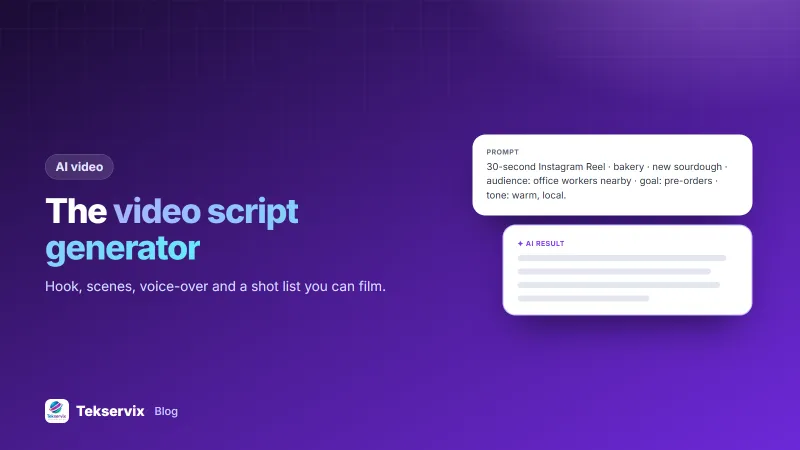
A video script generator turns a brief, such as your product, audience, goal, platform and length, into a structured script: each scene with what to show, what to say in voice-over, and what text to put on screen. Some tools add storyboard frames, rough images of each scene, so you can see the video before filming it.
The Tekservix video script and storyboard generator works this way: describe your video and it returns a scene-by-scene script with visuals, voice-over and on-screen text, plus AI storyboard frames.
Write a brief that produces a good script#
The better the brief, the less rewriting afterwards. Include:
- Platform and length: a 30-second Instagram Reel, a 60-second TikTok, a 90-second website explainer.
- The one message: what should viewers remember? "Our new sourdough is baked fresh at 6 every morning."
- The audience: "office workers within walking distance".
- The action you want: pre-order on WhatsApp, visit the shop, book a call.
- Tone: warm and local, energetic, calm and professional.
- What you can film: your shop, your products, your team, your phone. Say so, and the script won't ask for drone shots.
The first three seconds#
On social media, viewers decide almost instantly whether to keep watching. Good hooks for business videos:
- Show the result first: the finished cake, the clean car, the before-and-after room.
- Ask the viewer's question: "Still eating a sad desk lunch?"
- Make a specific claim: "This loaf takes 18 hours to make. Here's why."
- Start mid-action: hands kneading dough, not a logo on a blank screen.
Put your logo at the end, not the start. Nobody stays for a logo.
A simple structure that works#
- Hook (0-3 seconds): the reason to keep watching.
- Problem or context (3-8 seconds): why this matters to the viewer.
- The product or answer (8-22 seconds): show it working, with two or three specific details.
- Proof (optional): a real customer reaction, a number, a close-up of quality.
- Call to action (last 3-5 seconds): one clear next step, on screen and spoken.
A 30-second video has room for roughly 60 to 80 spoken words. If the voice-over is longer, cut words, not scenes.
Voice-over and on-screen text#
Many people watch social videos with the sound off, so the video must make sense without audio:
- Put the key message on screen as short text, a few words per scene.
- Add captions for spoken parts. Platforms like YouTube let you add subtitles and captions, and most editing apps can generate them automatically; check them for mistakes.
- Write voice-over the way you speak, in short sentences. Read it aloud and time it before filming.
- Don't repeat word for word what's on screen; the text and voice should support each other.
Edit the script before you film#
An AI-generated script is a first draft. Go through it line by line:
- Check every fact: prices, times, product details. The tool doesn't know your menu changed.
- Replace generic lines ("quality you can trust") with specific ones ("baked at 6 every morning, sold out by 11").
- Cut what you can't film. If the script asks for a crowded shop and yours is quiet at filming time, change the scene.
- Make it sound like you. Our guide to making AI writing sound human works for scripts too.
Turn the script into a shot list#
Before filming, list every shot from the script in the order you'll film them, grouped by location, not by the order they appear in the video. For each shot, note what's in frame, the angle and roughly how long it lasts. Film each shot two or three times, and a few extra seconds before and after, so you have room to cut in editing.
Storyboard frames help here: they show the team what each shot should look like, so the person holding the phone isn't guessing.
Filming on a phone#
- Vertical (9:16) for Reels, TikTok, Stories and WhatsApp Status; horizontal (16:9) for YouTube and websites.
- Light from a window in front of or beside the subject, never behind.
- Steady shots: a small tripod or the phone resting on something solid.
- Clean sound: record voice-over separately in a quiet room, close to the phone, if the location is noisy.
- Clean the lens before every session.
Measure and improve#
After posting, look at how long people watch, not just views. If most viewers leave in the first two seconds, the hook needs work. If they leave halfway, the middle is too slow. Change one thing in the next video and compare. Keep the scripts that worked as templates for future videos.
A worked example#
Imagine a bakery launching a new sourdough. The brief: a 30-second Reel for office workers nearby, goal pre-orders on WhatsApp, warm and local tone, filmed in the bakery with a phone. The generated script opens on a knife cutting through a crackling crust, then shows the dough resting overnight, the 6 a.m. oven, and a customer taking the first bite, with on-screen text "18 hours to make. Ready at 7 a.m." and a final card, "Pre-order on WhatsApp: 07700 900000". The owner changes one generic line to the real price, drops a scene that needed a full shop, and films everything in one morning. For images to go with the post, see our guide to AI image prompts.
Frequently asked questions
What does a video script generator do?
It turns a short description of your video, such as the product, audience, goal and length, into a scene-by-scene script with what to show, what to say and what text to put on screen. Some also produce storyboard images of each scene.
How long should a business video script be?
For social media, 15 to 60 seconds is typical, which is roughly 40 to 150 spoken words. Explainer videos for a website can run one to two minutes. Shorter is almost always better for a first video.
Do I still need to edit an AI-generated video script?
Yes. Check every claim and price, replace generic lines with your own words and real details, read it aloud to hear how it sounds, and cut anything you can't actually film.

Tekservix Team
The team behind Tekservix
The Tekservix Team builds and supports Tekservix: WhatsApp and SMS APIs, AI tools, invoicing, PDF and SEO tools for growing businesses. We write practical, tested guides based on what we see our customers do every day.
More articles from the Tekservix Team