SMS Auto Reply: Keywords, Templates and Rules for Automatic Text Replies
Set up an SMS auto reply that helps customers: keyword replies for prices, hours and bookings, after-hours messages, STOP and HELP, avoiding reply loops, templates and when a person should take over.
On this page
Customers text at all hours, and many of their questions are the same: what does it cost, when are you open, where are you, can I book? An SMS auto reply answers those instantly, day or night, so nobody waits until morning for a price list. Done well, it feels like a helpful assistant. Done badly, it's a wall of robotic text that leaves people more confused. Here's how to set it up the right way.
Two kinds of auto reply#
- Keyword replies answer messages containing a specific word, such as PRICE, HOURS, MENU or BOOK.
- General replies answer any message during set times, such as outside business hours, or the first message from a new number.
Most businesses use both: keywords for common questions, and a general reply for after hours.
Choosing keywords#
Keep the list short, simple and easy to type on any phone:
- One word each, no spaces or symbols: PRICE, HOURS, WHERE, BOOK.
- Accept variations: PRICE, PRICES, and the word in the languages your customers use.
- Ignore case and extra spaces, so "price", " Price " and "PRICE!" all work.
- Tell people the keywords exist: on your signs, receipts and the reply for unknown messages.
Five to eight keywords cover most businesses. More than that and nobody remembers them.
Templates#
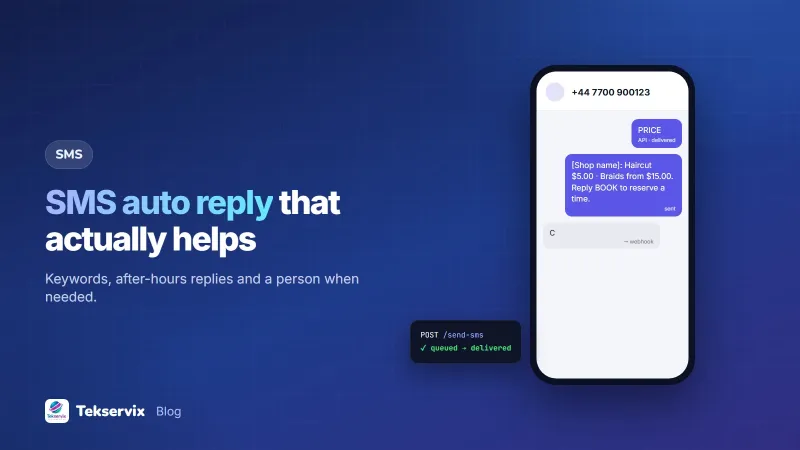
PRICE: [Business name]: Haircut C$5 beard trim C$3 braids from C$15. Reply BOOK to reserve a time.
HOURS: [Business name]: Open Mon-Sat 08:00-19:00, Sun 10:00-16:00. Reply WHERE for directions.
WHERE: [Business name]: 11 King Street, opposite [landmark], first floor. Call 07700 900000 if you get lost.
BOOK: [Business name]: To book, reply with the service, day and time you'd like, e.g. "Braids Sat 10:00". We'll confirm within 30 minutes during opening hours.
After hours: [Business name]: Thanks for your message! We're closed now and will reply after 08:00. Reply PRICE or HOURS for instant info.
Unknown message: [Business name]: Thanks! A team member will reply soon. For quick answers, reply PRICE, HOURS, WHERE or BOOK.
Each reply starts with the business name, answers the question in one SMS, and points to a next step. Keep replies under 160 characters where you can; longer texts are billed as several messages.
STOP and HELP#
Two keywords have special status. STOP means the person wants no more marketing messages, and you must respect it immediately. HELP should return who you are and how to reach a person. In the United States, for example, the mobile industry's CTIA Messaging Principles and Best Practices set expectations for STOP and HELP, and similar norms apply in many markets.
Confirm a STOP once, briefly, and then send nothing else: "[Business name]: You won't receive further offers. Reply START to rejoin." People often use other words too, such as "unsubscribe", "cancel" or "quit"; treat those the same way. Our guide to handling SMS opt-outs covers the record-keeping side.
Avoid reply loops#
An auto reply that answers another automated number can trigger an endless exchange: your system replies, theirs replies, and so on until someone notices the bill. Protect against it:
- Limit auto replies to one per number within a set period, such as once every few hours for the general reply.
- Don't auto-reply to short codes or bank and operator alerts.
- Never auto-reply to messages your own system sent.
Setting it up with an SMS gateway#
SMS Gora includes keyword auto replies that answer words like PRICE or HOURS around the clock, with replies rate-limited so two automated systems can never loop. People who text STOP are removed from your campaigns automatically, and START adds them back. Because SMS Gora sends through an Android phone and SIM you control, auto replies come from your normal number, and customers can keep the conversation going with a real person. Receiving texts requires the receiving edition of the Android app.
For anything more complex, such as checking a booking system for free slots, use a webhook: incoming texts are sent to your server, your code decides the reply, and it's sent back through the API. Our guide to receiving SMS by webhook shows how.
When a person should take over#
Auto replies are for simple, repeated questions. Hand over to a person when:
- The message is a complaint or sounds upset.
- The customer has asked the same thing twice, which means the auto reply didn't help.
- It involves money: refunds, disputes, payment problems.
- It's urgent or sensitive.
Make sure someone checks incoming messages regularly during opening hours. An auto reply that promises "we'll reply within 30 minutes" is only helpful if it's true.
Test before going live#
- Text every keyword from another phone, in upper and lower case.
- Text a random message to see the unknown-message reply.
- Test after hours to check the general reply.
- Text STOP and START and check your records update.
- Read every reply on a basic phone to check it's clear and fits in one SMS.
A worked example#
Imagine a hair salon that gets dozens of texts a day asking about prices and opening times. It sets up four keywords (PRICE, HOURS, WHERE, BOOK), an after-hours reply, and a reply for unknown messages that lists the keywords. The keywords go on a small sign at the reception desk and at the bottom of every appointment reminder. Within a week, most price and hours questions are answered automatically, including late at night, and staff spend their text time confirming bookings instead of typing the same price list. For wording that turns bookings into visits, see SMS appointment reminders.
Frequently asked questions
What is an SMS auto reply?
An SMS auto reply is a text message sent automatically in response to an incoming SMS, either to any message during set hours or to messages containing a keyword such as PRICE, HOURS or BOOK.
How do I set up keyword auto replies for SMS?
Use an SMS gateway or provider that supports auto replies, choose a few simple keywords, write a short reply for each, and test them from another phone. Keep a reply for unknown messages that tells people how to reach a person.
Can two auto replies get stuck in a loop?
Yes, if your auto reply answers another automated system that also replies. Good gateways rate-limit auto replies per number to prevent this, and you should never auto-reply to short codes or to your own replies.

Tekservix Team
The team behind Tekservix
The Tekservix Team builds and supports Tekservix: WhatsApp and SMS APIs, AI tools, invoicing, PDF and SEO tools for growing businesses. We write practical, tested guides based on what we see our customers do every day.
More articles from the Tekservix Team