SMS Keyword Campaigns: How 'Text JOIN to…' Works and How to Run One
'Text JOIN to 07700 900123' is one of the simplest ways to grow a text list or answer customers instantly. Here's how an SMS keyword campaign works, how to set one up, and examples that work for shops, events, restaurants and schools.
On this page
- How a keyword campaign works
- Two kinds of keyword campaign
- List-building keywords
- Information keywords
- Choosing good keywords
- The opt-in flow, done properly
- STOP and HELP
- Where to promote your keyword
- Examples by industry
- Short codes, long codes and your own number
- Writing the auto-replies
- Measuring a keyword campaign
- Start with one keyword this week
You've seen them on posters, receipts and radio ads: "Text JOIN to 07700 900123 for 10% off." "Text MENU for today's specials." "Text VOTE1 to support your favourite." They look simple because they are, and that's exactly why SMS keyword campaigns work. The customer does one tiny action, and your system does the rest.
Here's how an SMS keyword campaign works behind the scenes, how to set one up properly, and examples you can adapt for your own business.
How a keyword campaign works#
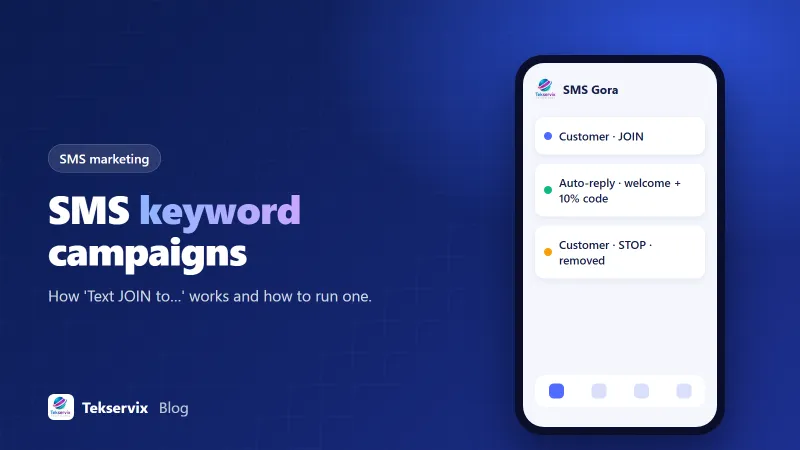
- You choose a keyword, like JOIN, and a phone number customers text it to.
- You promote it: "Text JOIN to 07700 900123".
- A customer texts the keyword.
- Your SMS system recognises the word and sends an automatic reply, perhaps a welcome message, a discount code or a link.
- Depending on the keyword, the number is added to a list, tagged, or simply answered.
That's it. No app to download, no form to fill in, no email address. For customers, it's about as easy as interacting with a business gets.
Two kinds of keyword campaign#
List-building keywords#
These grow your marketing list: JOIN, VIP, DEALS, CLUB. The customer opts in by texting, and you send future offers. Because they're for marketing, they need clear consent language and an opt-out, which we'll cover below.
Information keywords#
These answer questions instantly: MENU, HOURS, PRICES, BOOK, PARKING. They don't add anyone to a list; they just send useful information. They're great for reducing repetitive calls and messages.
Most businesses benefit from both: one or two list-building keywords and a handful of information keywords.
Choosing good keywords#
- Short and easy to spell: JOIN beats MEMBERSHIP2026.
- One word, no spaces, no special characters.
- Meaningful: DEALS for offers, MENU for the menu.
- Not easily confused: avoid words that autocorrect into something else.
- Case shouldn't matter: make sure your system treats join, Join and JOIN the same.
Also plan for typos and near misses. If someone texts "JOINN" or "join please", a helpful default reply ("Sorry, we didn't recognise that. Text JOIN for offers or MENU for today's menu") is much better than silence.
The opt-in flow, done properly#
For list-building keywords, your first reply matters legally and practically. A good confirmation message includes:
- Who you are.
- What they've signed up for and roughly how often you'll text.
- How to stop: "Reply STOP to opt out."
- Any reward you promised.
Example: "Welcome to Greenway Coffee VIP! Expect 2 to 4 texts a month with offers. Here's 10% off your next order: VIP10. Reply STOP to opt out."
Many businesses use double opt-in for extra certainty: "Reply YES to confirm you'd like offers from Greenway Coffee." Only after the YES does the number join the list. It reduces accidental sign-ups and makes your consent record stronger. Rules vary by country, so check what applies where your customers are.
STOP and HELP#
Two keywords should work on every business number. STOP (and usually variants like UNSUBSCRIBE or CANCEL) removes the person from marketing messages and sends a short confirmation. HELP sends a reply explaining who you are and how to contact you. In some countries these are legal or carrier requirements, and they're good practice everywhere. Our guide to STOP and opt-outs covers the details.
Where to promote your keyword#
- Receipts and order confirmations.
- Posters, table tents and counter cards in your shop or restaurant.
- Packaging and inserts.
- Your website, especially the contact and offers pages.
- Social media posts and bios.
- Radio, events and printed adverts, where typing a URL is awkward but texting a word is easy.
Always say what people get: "Text JOIN for 10% off your next visit" works far better than "Text JOIN to join our list".
Examples by industry#
- Restaurant: MENU for today's specials, BOOK for the reservation link, JOIN for monthly offers.
- Retail shop: DEALS for current promotions, STOCK plus a product code for availability.
- Gym: CLASSES for the timetable, TRIAL for a free first visit.
- School: CLOSURES for weather and closure alerts, EVENTS for the calendar.
- Event organiser: TICKETS for the booking link, PARKING for directions.
- Estate agent: a property code (TEXT 4521) to receive details and photos of a specific listing.
That last example is a neat trick: a unique keyword per product or property lets you track interest in each one and follow up with the right information.
Short codes, long codes and your own number#
Large campaigns, especially in the US, often run on short codes, five or six digit numbers built for high volume. They're expensive and take time to approve. For most businesses, an ordinary mobile number works perfectly well for keywords, and customers can save it as a contact. Our comparison of short codes and long codes explains the trade-offs.
SMS Gora runs keyword auto-replies on your own number through an Android phone and SIM. You set the keywords and replies in the dashboard, STOP opt-outs are handled automatically, and everything else lands in a shared inbox so your team can answer real questions. Plans start at $3.99 a month with unlimited SMS.
Writing the auto-replies#
The reply is the whole experience, so it deserves more thought than the keyword. Keep it under 160 characters where you can, since longer texts are split into parts and can arrive out of order on some phones. Lead with the thing they asked for. If someone texts HOURS, the first words should be the hours, not "Thanks for contacting Greenway Coffee!"
A few habits help:
- Put links near the end, and use a short, recognisable domain. Long tracking links look suspicious in a text.
- Give a next step: "Reply BOOK for the booking link" turns one keyword into a small conversation.
- Say when a human will reply if the question needs one: "Our team will text you back within the hour, 9am to 6pm."
- Review the replies every few months. Out-of-date opening hours or an expired code is worse than no reply.
A common mistake is sending the same reply to every keyword because it was quicker to set up. If someone texted MENU, send the menu. Specific replies are what make people use the keyword a second time.
Measuring a keyword campaign#
Track how many people text each keyword, how many confirm the opt-in, how many redeem the offer, and how many opt out over the following months. Use different keywords in different places (JOIN on receipts, VIP on posters) to see which promotion brings the most sign-ups. After a few weeks, you'll know exactly where your text list grows, which is more than most marketing channels can tell you.
Start with one keyword this week#
Pick a single information keyword that answers your most common question, set up the reply, and put it on your counter or website. Once you see how often people use it, add a list-building keyword with a small reward. It's one of the cheapest experiments in marketing, and the results show up within days.
Frequently asked questions
What is an SMS keyword?
A word customers text to your number to trigger an action, such as joining a list (JOIN), getting information (MENU, HOURS) or entering a promotion (WIN). Your system recognises the word and sends an automatic reply.
Do I need a short code for keyword campaigns?
No. Short codes are common for very large campaigns, especially in the US, but keywords work with an ordinary mobile number too. In many countries, a local mobile number is the cheapest and simplest option.
Is texting a keyword enough consent for marketing messages?
It's a strong start, because the customer took action. Many businesses also send a confirmation asking them to reply YES (double opt-in), and every reply should explain what they'll receive and how to opt out with STOP.

Tekservix Team
The team behind Tekservix
The Tekservix Team builds and supports Tekservix: WhatsApp and SMS APIs, AI tools, invoicing, PDF and SEO tools for growing businesses. We write practical, tested guides based on what we see our customers do every day.
More articles from the Tekservix Team