API Key Security: How to Store, Use and Rotate Keys Without Leaking Them
API key security for developers and small teams: where keys leak from, storing them in environment variables and secret managers, keeping them out of frontends and Git, least privilege, rotation and what to do after a leak.
On this page
An API key is a password that never gets tired. Whoever has it can send messages from your number, spend your credits, read your customers' data or run up a bill, and the provider can't tell them apart from you. Most leaks aren't clever hacks; they're a key pasted into code that ended up on GitHub, in a browser, or in a screenshot. API key security is mostly about a few habits that make those accidents impossible.
Where keys usually leak#
- Committed to Git in a config file or source code, then pushed to a public or shared repository.
- Frontend code: keys placed in JavaScript or a mobile app, where anyone can read them.
- Logs: full request headers or URLs containing keys, written to log files or error trackers.
- Screenshots and screen shares of dashboards, terminals or code.
- Chat and email: keys sent to a colleague or freelancer in plain text.
- Old laptops and backups with project folders nobody cleaned up.
Automated tools scan public repositories for secrets constantly, so a key pushed to a public repository can be found within minutes. GitHub describes how its secret scanning detects leaked credentials, which shows how common the problem is.
Store keys outside your code#
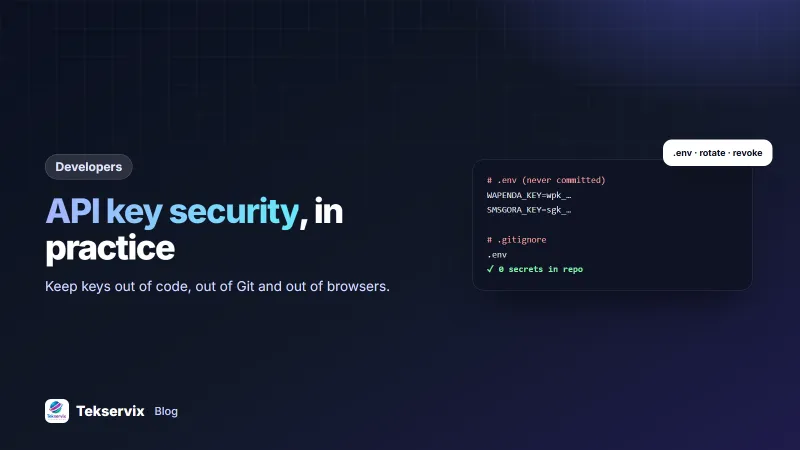
Keep keys in environment variables, loaded at runtime:
# .env  (listed in .gitignore, never committed)
WASERVIX_KEY=wpk_your_device_key
SMSGORA_KEY=sgk_your_key
# Python
import os
key = os.environ["WASERVIX_KEY"]
// Node.js
const key = process.env.WASERVIX_KEY;
// PHP
$key = getenv('WASERVIX_KEY');- Add
.envto.gitignorebefore your first commit. - Commit a
.env.examplewith placeholder values, so others know which variables to set. - On servers and hosting platforms, set environment variables in the platform's settings, not in files inside the web root.
- For larger teams, use a secret manager, which controls who can read each secret and logs access.
Keep keys off the frontend#
Anything that runs in a browser or ships in a mobile app can be inspected. A secret key in frontend code is a public key. Instead:
- The frontend calls your own server, for example
POST /api/send-reminder. - Your server checks the user is allowed to do that.
- Your server calls the provider with the key it holds.
This also lets you add your own limits, such as a maximum number of messages per user per hour, which protects you if someone abuses your frontend.
Give each key as little power as possible#
- Separate keys per environment: development, staging and production each get their own.
- Separate keys per application or integration, so revoking one doesn't break everything.
- Use the narrowest key type available. WAservix, for example, has device API keys (
wpk_) that only control one WhatsApp number, and separate personal access tokens (wpt_) for managing devices across an account. Use the device key when that's all an integration needs. - Set expiry dates where the provider allows it, especially for keys given to contractors or used for short projects.
Rotate keys#
Rotation means replacing a key with a new one on a schedule or after a change, such as a team member leaving. A smooth rotation:
- Create a new key.
- Update the application's environment variable and redeploy.
- Confirm everything works with the new key.
- Revoke the old key.
Rotate at least when someone with access leaves, when a laptop is lost, and whenever you're unsure whether a key was exposed.
Don't log secrets#
Configure logging to remove or mask authorisation headers, and never put keys in URLs, where they end up in server logs, proxies and browser history. Log a short identifier instead, such as the last four characters, if you need to know which key made a request.
When a key leaks#
- Revoke or regenerate it immediately in the provider's dashboard. This is the only step that actually stops misuse.
- Update your application with the new key.
- Check the provider's logs for activity you don't recognise: messages sent, credits used, data read.
- Find the cause and fix it, such as removing the file from the repository and adding it to .gitignore.
- Tell anyone affected if customer data may have been accessed, as your legal obligations require.
Deleting the commit isn't enough; the key may already have been copied. Treat any key that was ever public as compromised.
A small-team checklist#
- No keys in source code or Git history.
- .env files ignored by Git.
- No secret keys in frontend or mobile code.
- Separate keys per environment and integration.
- Keys shared through a password manager or secret manager, never chat.
- Logs mask authorisation headers.
- A written, tested process for revoking and rotating keys.
For the related job of checking that incoming webhooks are genuine, see our guide to webhook signature verification. If you build on Tekservix, the developer platform lets you create API keys with expiry dates and revoke them when they're no longer needed.
A worked example#
Imagine a small agency that built a booking site for a client, with the SMS gateway key written directly in a JavaScript file. A developer notices it while reviewing the site: anyone could send texts from the client's phone number. The fix takes an afternoon. They regenerate the key, move sending to a small server endpoint that checks the booking exists before texting, store the new key in the server's environment settings, and add a limit of three texts per booking. They also scan their other projects for keys in code and find two more, which they rotate the same day. For testing the new endpoint, see our API testing guide.
Frequently asked questions
Where should I store API keys?
In environment variables or a secret manager on the server, loaded by your application at runtime. Never hard-code them in source files, commit them to Git, or put them in frontend code where anyone can read them.
What should I do if an API key leaks?
Revoke or regenerate the key immediately in the provider's dashboard, update your application with the new key, check the provider's logs for misuse, and find and fix how it leaked. Removing it from Git history alone isn't enough.
Can I use an API key in a mobile app or website frontend?
Not a secret one. Anything shipped to users' browsers or phones can be extracted. Send requests from your own server instead, and let the frontend call your server, which holds the key.

Tekservix Team
The team behind Tekservix
The Tekservix Team builds and supports Tekservix: WhatsApp and SMS APIs, AI tools, invoicing, PDF and SEO tools for growing businesses. We write practical, tested guides based on what we see our customers do every day.
More articles from the Tekservix Team