How to Check if a Number Is on WhatsApp (One at a Time or by API)
How to check if a number is on WhatsApp before you message it: the manual way, click-to-chat links, checking by API, cleaning a customer list, falling back to SMS, and what's acceptable to check.
On this page
Customer lists are full of numbers that will never receive a WhatsApp message: landlines, old SIMs, numbers typed wrong, and people who simply don't use WhatsApp. Sending to them wastes time, fills your queue, and at scale makes your number look like a spammer's. If you check if a number is on WhatsApp before messaging, you know straight away whether to use WhatsApp, SMS or email for that person.
The manual way: save the number#
For a single number, the simplest method is to save it in your phone's contacts, open WhatsApp and look for it in your contact list or start a new chat. If the person has WhatsApp, they appear with an option to message them. It works, but saving numbers you only want to check clutters your contacts, and it's slow for more than a few.
Without saving: click-to-chat links#
WhatsApp's click-to-chat link opens a chat with any number without saving it. Use the number in full international format, without the plus sign, spaces or dashes:
https://wa.me/447700900123If the number is on WhatsApp, a chat opens. If it isn't, WhatsApp shows a message that the phone number shared via the link is invalid. It's handy for checking a handful of numbers, and the same link format is useful on your website so customers can message you in one tap.
For businesses: check by API#
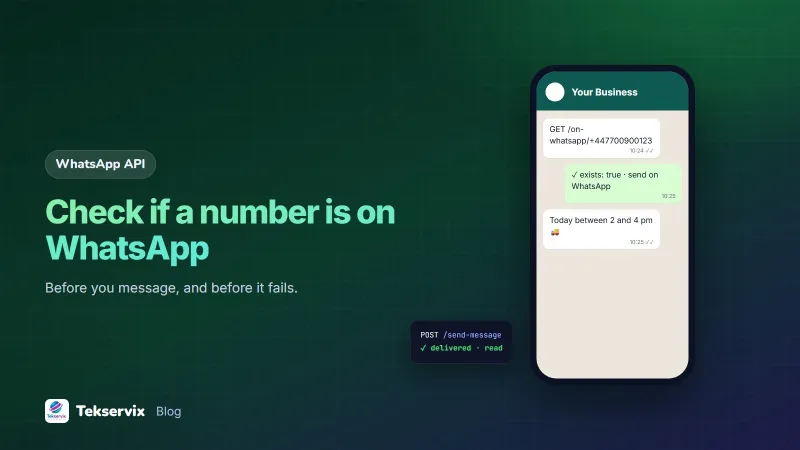
When customers sign up, order or book, your system can check their number automatically before the first message. With WAservix, a single request does it:
GET https://tekservix.com/waservix/api/on-whatsapp/+447700900123
Authorization: Bearer wpk_your_device_key

{ "success": true, "data": { "exists": true, "jid": "447700900123@s.whatsapp.net" } }
If exists is false, don't send a WhatsApp message; use SMS or email for that customer instead. WAservix's account protection, which is on by default, also checks each new number is on WhatsApp before sending to it, so a campaign doesn't waste messages on numbers without WhatsApp. The WAservix API documentation lists the endpoint with the other contact tools.
When to check#
- At sign-up or checkout, when the customer gives their number. If it's not on WhatsApp, ask whether they'd prefer SMS or email, while they're still on the page.
- Before the first message to a new contact.
- Before a campaign to a list that hasn't been messaged in a while.
Store the result on the customer's record, with the date, so you don't check the same number every time. Recheck occasionally, since people join and leave WhatsApp.
Clean the number first#
A check only helps if the number is in the right format. Before checking:
- Remove spaces, dashes and brackets.
- Convert local formats to international: a UK 07700 900123 becomes +447700900123.
- Remove obvious errors: too few digits, letters, repeated digits.
- Remove duplicates.
Many "not on WhatsApp" results are really formatting mistakes. Our guide to sending WhatsApp messages from PHP includes a small function that normalises numbers.
Fall back to SMS#
A number that isn't on WhatsApp is still reachable by SMS in most cases. A sensible approach for order updates and reminders:
- Check whether the number is on WhatsApp.
- If yes, send on WhatsApp.
- If no, or if the WhatsApp message isn't delivered within a set time, send a short SMS instead.
That way every customer is reached, and the richer channel is used wherever it's available. Our guide to SMS vs WhatsApp explains how to combine them, and SMS Gora sends the SMS side from your own Android phone and SIM.
What's acceptable, and what isn't#
Checking the numbers of your own customers, who gave them to you and agreed to hear from you, is ordinary good practice. It improves delivery and avoids annoying people with messages that fail.
Checking large lists of numbers you bought, scraped or generated, to find WhatsApp users to message, is a different thing entirely. It's how spam campaigns start, it breaks WhatsApp's rules, and it's likely to break data protection law in many countries. Heavy lookup activity on many unknown numbers can also get your own number restricted. WhatsApp's Business Messaging Policy makes clear that businesses should only message people who have given permission.
Common questions from teams#
- "The check says yes, but the message isn't delivered." The person may have blocked you, their phone may be off, or they rarely use WhatsApp. Watch delivery status and fall back to SMS after a reasonable time.
- "The check says no, but the customer says they use WhatsApp." The number may be stored in the wrong format, or they use WhatsApp on a different number. Ask them to confirm it.
- "Should we check the whole list every week?" No. Check new numbers, store the result, and recheck old ones occasionally.
A worked example#
Imagine an online shop sending order updates to every customer on WhatsApp and seeing many fail. It adds a check at checkout: when the customer enters a number, the site normalises it and asks WAservix whether it's on WhatsApp. If yes, the order confirmation goes on WhatsApp; if no, the page asks, "We'll send your updates by SMS. Is that okay?" and SMS Gora sends them instead. Failed WhatsApp messages almost disappear, customers without WhatsApp still get their updates, and the shop's number stops sending to numbers that were never going to receive anything.
Frequently asked questions
How can I tell if a number has WhatsApp without saving it?
Open a click-to-chat link in the form wa.me/ followed by the number in international format, without the plus sign or spaces. If the number has WhatsApp, a chat opens; if not, WhatsApp shows a message that the phone number shared via the link is invalid.
How do businesses check many numbers at once?
With a WhatsApp API that has a lookup endpoint. With WAservix, GET /on-whatsapp/{phone} returns whether the number exists on WhatsApp, which lets your system check new customers before sending and fall back to SMS if needed.
Is it okay to check whether numbers are on WhatsApp?
Checking numbers of your own customers before sending them messages they agreed to is reasonable. Checking large lists of numbers you obtained elsewhere, to find people to message, is not, and it's the pattern spammers use.

Tekservix Team
The team behind Tekservix
The Tekservix Team builds and supports Tekservix: WhatsApp and SMS APIs, AI tools, invoicing, PDF and SEO tools for growing businesses. We write practical, tested guides based on what we see our customers do every day.
More articles from the Tekservix Team