Strong Password Generator: How to Create Passwords That Can't Be Guessed
What makes a password strong, how a strong password generator works, random characters vs passphrases, how long is long enough, checking for leaks safely and storing what you generate.
On this page
Most stolen accounts are not hacked in a film-style break-in. Someone guessed a weak password, or reused one that leaked from another site years ago. A strong password generator solves both problems at once: it creates a password no person would think of, and it makes it painless to use a different one for every account. This guide explains what "strong" actually means, how to pick between random characters and passphrases, and what to do with the password once you have it.
What makes a password strong#
Strength comes from one thing: how many guesses an attacker would need. That depends on two factors.
- Length. Every extra character multiplies the possibilities.
- Randomness. A password chosen by a person follows patterns: a word, a capital at the start, a year and an exclamation mark at the end. Attackers' cracking tools try those patterns first.
"Summer2025!" ticks every complexity box and falls in seconds. A 20-character string picked by a computer takes longer to guess than anyone will be alive. The difference is not the symbols. It is that nobody chose it.
The US National Institute of Standards and Technology reflects this in its digital identity guidelines (SP 800-63B): it favours long passwords, recommends checking new passwords against lists of known breached ones, and advises against forced periodic changes and arbitrary composition rules.
How a password generator works#
A good generator does three things:
- Uses a secure random source. In a browser this is the Web Crypto API (
crypto.getRandomValues), not the ordinaryMath.randomfunction, which is predictable enough to be unsafe for secrets. - Picks each character independently from the allowed set, without bias toward some characters.
- Never sends the result anywhere. The password should exist only on your screen until you save it.
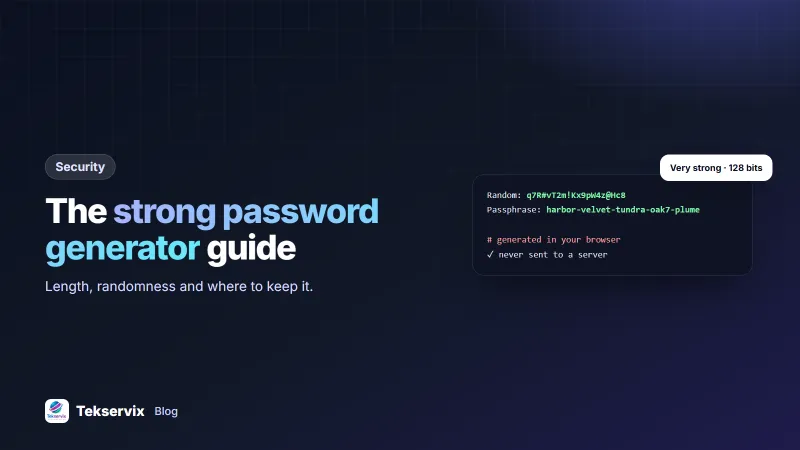
The generator in Tekservix utilities, at the password tool, does all three. It runs in your browser, uses the secure random source with a method that avoids bias, and shows an estimate of strength in bits and how long guessing would take at 10 billion attempts per second.
Understanding entropy, in plain terms#
Strength is often measured in bits of entropy. Each bit doubles the number of guesses needed. A rough guide:
- Under 40 bits: weak. Fast hardware gets through it quickly.
- 40 to 60 bits: fair for low-value accounts with rate limiting.
- 60 to 80 bits: strong for most uses.
- 80 bits and above: very strong, suitable for email, banking and password manager master passwords.
A random password using upper and lower case letters, digits and symbols carries a little over 6 bits per character. Twenty characters gives roughly 130 bits, far beyond what any attacker can try.
Random characters or a passphrase?#
Both are strong when a tool picks them. Use each where it fits:
- Random characters suit accounts you never type by hand, because a password manager fills them in. Use 16 to 20 characters.
- Passphrases suit passwords you must type or remember: your computer login, your phone, your password manager. Five random words with a separator, like
harbor-velvet-tundra-oak7-plume, are strong and easy to type on a phone keyboard.
The key word is random. "ilovemydog" is four words and is weak, because you picked them. Let the generator choose.
Settings worth changing#
- Avoid look-alike characters (l, 1, O and 0) if you'll ever read the password aloud or type it from paper.
- Turn symbols off only for sites that reject them, and add length to compensate.
- Raise the length rather than adding rules. Going from 12 to 16 characters adds far more strength than forcing a symbol.
Check whether a password has leaked#
A password that appeared in a data breach is weak no matter how random it looks, because attackers try leaked lists first. Services like Have I Been Pwned keep a list of hundreds of millions of breached passwords. A careful checker never sends your password: it hashes it, sends only the first five characters of the hash, and compares the matches on your device. The Tekservix tool uses exactly this method, so you can check an old password without exposing it.
Where to keep generated passwords#
A password you can't find again is a support ticket waiting to happen. Options, from best to worst:
- A password manager with end-to-end encryption, where your master password unlocks the vault on your own device and the provider can never read what's inside. The Tekservix vault in the same utilities page works this way.
- A written list kept somewhere physically safe, for people who won't use software. Better than reusing one password everywhere.
- Never in a plain text file, an email to yourself or a shared spreadsheet.
For important accounts, add a second factor as well. A strong password plus two-factor authentication stops nearly all account takeovers.
For businesses and developers#
If you manage staff accounts or build software, the same rules scale up. Don't email passwords to new employees; send a one-time setup link. Store API credentials in environment variables, as our API key security guide describes, and store user passwords only as slow, salted hashes. Shared secrets for webhooks deserve the same care; our guide to webhook signature verification shows how they're used. If a system forces you to share one login among a team, that is a sign to switch to individual accounts.
A worked example#
Imagine the owner of [Shop name] who has used one password, a pet's name plus a year, for email, the bank, the supplier portal and the online shop for eight years. They check it in the leak tool and find it in two known breaches. That evening they set up a password manager with a six-word passphrase as the master password, then work through accounts in order of damage: email first, because it resets everything else, then banking, then the shop admin. Each gets a fresh 20-character password from the generator. It takes about an hour. The next time a site they use is breached, one password is exposed, not all of them.
Frequently asked questions
How long should a strong password be?
For an account protected only by a password, aim for at least 15 random characters, or a passphrase of five or more random words. Length matters more than symbols: each extra random character multiplies the number of guesses an attacker needs.
Are online password generators safe to use?
They are safe when the password is created in your browser with a cryptographically secure random generator and never sent to a server. Look for a tool that works offline once loaded and says where generation happens. The Tekservix generator runs entirely in your browser.
Is a passphrase better than a random password?
A passphrase of five or six randomly chosen words is as strong as a long random password and much easier to type and remember. The words must be picked randomly by a tool, not chosen by you, because people pick predictable phrases.

Tekservix Team
The team behind Tekservix
The Tekservix Team builds and supports Tekservix: WhatsApp and SMS APIs, AI tools, invoicing, PDF and SEO tools for growing businesses. We write practical, tested guides based on what we see our customers do every day.
More articles from the Tekservix Team