Gym App Features Members Actually Use (and the Ones You Can Skip)
Members don't open a gym app to admire it. They open it to book a class, show their membership or check the timetable. Here are the gym app features that get used every week, the ones that rarely do, and how to get an app without a huge budget.
On this page
- Must-have features
- 1. Class booking and cancellation
- 2. Waitlists that work automatically
- 3. The timetable
- 4. Digital membership card or check-in
- 5. Membership and payments
- 6. Push notifications
- Nice to have
- Features that often go unused
- Small details that make a big difference
- Getting members to install it
- SMS still matters
- Three ways to get a gym app
- Your booking platform's member app
- Turn your booking website into an app
- A custom app
- Measure what members do
Ask a gym owner what their app should do and you'll get a long list: workout tracking, nutrition plans, social feeds, challenges, wearable sync, video classes. Ask members what they actually use it for and the list shrinks to about four things. Book a class. Cancel a class. Check the timetable. Show the check-in code at the door.
That gap explains why so many gym apps are expensive and underused. Here are the gym app features worth building first, the ones that tend to gather dust, and a sensible way to get an app without a big budget.
Must-have features#
1. Class booking and cancellation#
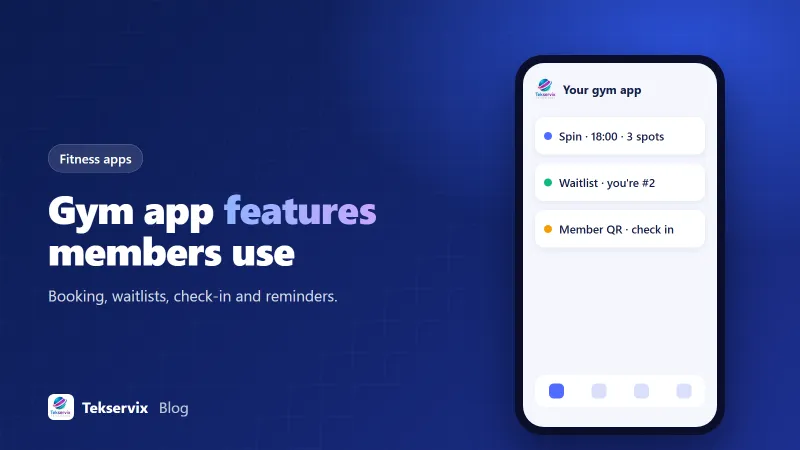
The single most-used feature by far. Booking should take a couple of taps: open the app, see today's and tomorrow's classes, tap, done. Cancelling should be equally easy, with your cancellation policy shown clearly ("Cancel up to 2 hours before to avoid a fee").
2. Waitlists that work automatically#
Popular classes fill up. A waitlist that automatically offers a freed-up spot and notifies the next person turns cancellations into attendance instead of empty bikes. Decide whether spots are confirmed automatically or need the member to accept within a time limit.
3. The timetable#
Clear, filterable by class type, instructor and location, with spaces left. Changes and cancellations should show prominently.
4. Digital membership card or check-in#
A QR code or barcode members scan at reception or the entry gate. It replaces plastic cards people forget and speeds up the front desk. If your entry system supports it, this is one of the most appreciated features.
5. Membership and payments#
Members want to see their plan, renewal date and payment history, update their card, buy class packs or a personal training session, and freeze membership when they travel. Every one of those tasks done in the app is one less email or desk conversation.
6. Push notifications#
Class reminders, waitlist offers, schedule changes and closure notices. These are the notifications members thank you for. Our list of push notification examples includes gym-specific ones.
Nice to have#
- Instructor profiles with photos and specialities, which help members try new classes.
- Booking personal training sessions with a specific trainer.
- Attendance history and simple streaks ("You've trained 3 times this week").
- Guest passes and referrals, so members can bring a friend.
- Multi-location support if you have more than one site.
- Calendar export, so booked classes appear in the member's phone calendar.
Features that often go unused#
These aren't bad ideas, but they're expensive to build and maintain, and many gyms find usage is low:
- Full workout logging. Members who track seriously usually already have a favourite fitness app.
- Nutrition plans and calorie tracking. Dedicated apps do this far better.
- In-app social feeds. Members already have social networks; a gym feed tends to go quiet.
- Wearable integrations, which take ongoing work as devices and APIs change.
- A large on-demand video library, unless online classes are a real part of your business.
If one of these is central to your brand, a strength coaching studio with programmed workouts, for example, build it. Otherwise, start with the essentials and add features members actually ask for.
Small details that make a big difference#
- Stay signed in. Nobody wants to log in at the door.
- Fast loading on poor signal. Many gyms have weak reception inside.
- Show remaining spaces, so members know when to hurry.
- Confirm every booking and cancellation clearly, with an option to add it to the calendar.
- Make the check-in code work offline, or cache it, in case there's no signal at the entrance.
- Send reminders at sensible times: the evening before for early classes, an hour before for evening ones.
Getting members to install it#
An app nobody downloads doesn't help anyone. The most effective moments to ask are the ones where the app is obviously useful:
- At sign-up, as the way to get the membership card: "Download the app for your check-in code."
- At the front desk, with a QR code linking to both app stores.
- In the booking confirmation email, especially for members who book on the website.
- When popular classes fill up: "App users get waitlist alerts first."
Staff matter more than posters here. A receptionist saying "it's quicker with the app, want me to show you?" converts far better than a sign on the wall. Track how many active members have the app, and aim to move that number a little every month.
SMS still matters#
Not every member installs the app, and push notifications only reach people who allowed them. For important messages, like a class cancelled an hour before or a failed membership payment, a text message reaches everyone. Our guide to SMS for gyms covers what to send by text and what to leave to the app.
Three ways to get a gym app#
Your booking platform's member app#
Many gym management systems include a member app, sometimes with your branding. It's the quickest route. The trade-offs are limited customisation, and sometimes the app carries the platform's brand more than yours.
Turn your booking website into an app#
If members already book on your website or a mobile-friendly booking page, you can turn it into an installable app with your own name, icon and push notifications. Everything you update on the site appears in the app instantly. Our Website to App service does this from a one-time $59.99 for Android, with a free test build before you pay. If you need native features on top, the Native App Builder starts at $35 a month.
A custom app#
Right for gym chains with unique features, deep integrations or a large budget. Expect a substantial build cost and ongoing maintenance. Our article on how much it costs to make an app breaks down the numbers.
Measure what members do#
After launch, track bookings made through the app, waitlist conversions, cancellations, check-ins and how many members have notifications switched on. If a feature isn't used after a few months, simplify or remove it. If members keep emailing to do something, that's your next feature.
The best gym apps aren't the ones with the most features. They're the ones that make booking a class quicker than texting a friend about it. Start there, and grow from what your members actually use.
Frequently asked questions
What features should a gym app have?
Start with class booking and cancellation, a waitlist, the timetable, a digital membership card or check-in code, membership and payment management, and push notifications for reminders and changes. Those cover most of what members do.
Do small gyms need their own app?
Not always. If your booking software has a good branded member app, that may be enough. An app of your own makes sense when you want your brand on members' home screens, push notifications under your control, or features your booking system's app doesn't offer.
How much does a gym app cost?
It ranges from a one-time fee for turning an existing booking website into an app, to tens of thousands for a fully custom build with wearable integrations. Most gyms get the best value by starting with the core features members use weekly.

Tekservix Team
The team behind Tekservix
The Tekservix Team builds and supports Tekservix: WhatsApp and SMS APIs, AI tools, invoicing, PDF and SEO tools for growing businesses. We write practical, tested guides based on what we see our customers do every day.
More articles from the Tekservix Team