HTTP Security Headers: The Six That Matter and Safe Values to Start With
HTTP security headers explained for site owners and developers: HSTS, Content-Security-Policy, X-Content-Type-Options, frame protection, Referrer-Policy and Permissions-Policy, with safe starting values and how to test them.
On this page
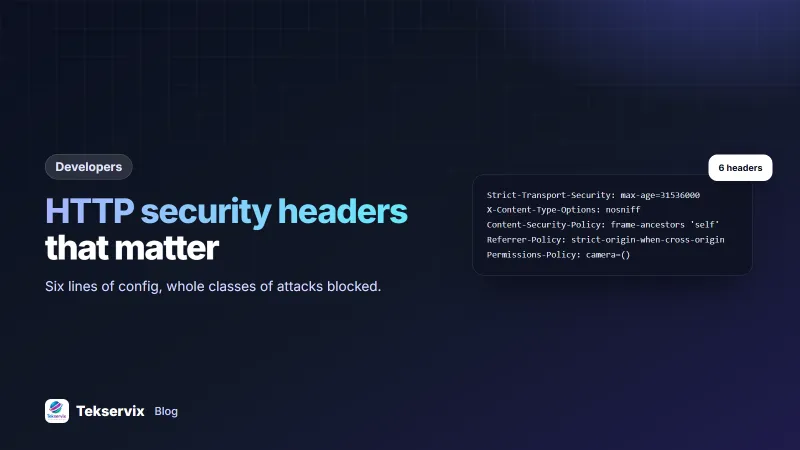
Every time a browser loads your page, your server sends invisible instructions along with it. HTTP security headers are the ones that tell the browser to be careful: only use HTTPS, don't run scripts from unexpected places, don't let another site wrap your page in a frame. Each takes one line of configuration, costs nothing, and shuts down attacks that would otherwise need careful coding to prevent. Yet many business sites send none of them.
Here are the six that matter most, what each does, safe values to start with, and how to roll them out without breaking anything.
1. Strict-Transport-Security (HSTS)#
Tells the browser to only ever use HTTPS for your domain, even if someone types http:// or follows an old link. It stops attackers on public Wi-Fi from downgrading a connection to plain HTTP.
Start with: Strict-Transport-Security: max-age=86400 (one day) while you confirm every part of the site works on HTTPS, then raise it to max-age=31536000 (one year). Add includeSubDomains only once every subdomain supports HTTPS. Submitting to the HSTS preload list is a further step that's hard to reverse, so leave it until you're certain.
2. Content-Security-Policy (CSP)#
The most powerful header and the one that takes the most care. CSP lists where scripts, styles, images, fonts and frames may load from. If an attacker manages to inject a script into your page, the browser refuses to run it because it isn't from an approved source. That makes it the main defence against cross-site scripting (XSS).
Start with: report-only mode, which logs violations without blocking anything:
Content-Security-Policy-Report-Only: default-src 'self'; img-src 'self' data: https:; script-src 'self' https://www.googletagmanager.com
Watch the browser console and reports for a week, add the legitimate sources you missed, then switch the header name to Content-Security-Policy. MDN's CSP reference lists every directive.
3. Frame protection#
Clickjacking hides your real page inside an invisible frame on an attacker's site, tricking visitors into clicking buttons they can't see, such as "Delete account" or "Confirm payment". Stop it by telling browsers who may frame your pages:
- Modern:
Content-Security-Policy: frame-ancestors 'self' - Older browsers:
X-Frame-Options: SAMEORIGIN
If you embed your own forms or widgets on other sites, list those sites in frame-ancestors for the embed pages only.
4. X-Content-Type-Options#
X-Content-Type-Options: nosniff stops browsers from guessing a file's type. Without it, a file uploaded as an image could be treated as a script. There's no reason not to set it on every response.
5. Referrer-Policy#
When someone clicks a link from your site, the browser can tell the next site which page they came from, including any private details in the URL, such as a password reset token or an order ID. Referrer-Policy: strict-origin-when-cross-origin sends only your domain to other sites while keeping full detail for your own analytics. It's the default in modern browsers, but setting it explicitly protects older ones.
6. Permissions-Policy#
Controls which browser features your pages and any embedded third-party content can use: camera, microphone, location, payment and so on. Turn off what you don't use:
Permissions-Policy: camera=(), microphone=(), geolocation=()
If a feature page needs one, such as a store locator using location, allow it on that page only.
Where to set them#
- Apache:
Header always setlines in the site config or.htaccess. - Nginx:
add_header ... always;in the server block. - Cloudflare and other CDNs: response header rules in the dashboard.
- Managed platforms: a security or headers plugin, or ask your host.
- Application code: middleware in your framework, useful when different pages need different policies.
Use the always option where available, so headers are also sent on error pages.
Test what you send#
- Open your site, press F12, go to the Network tab, reload, click the main document and read the response headers.
- Check the console for CSP violations.
- Run a Lighthouse report. Its best-practices section, included in the PageSpeed check in Tekservix SEO tools, flags an ineffective Content Security Policy among other issues.
- Test key journeys after each change: login, checkout, forms, embedded videos and payment pages.
Headers that are outdated#
X-XSS-Protection: modern browsers have removed the feature it controlled. Leave it out, or set it to0.Expect-CT: no longer needed.Public-Key-Pins: removed from browsers; it caused more outages than it prevented.
Headers are one layer#
Headers make attacks harder; they don't fix vulnerable code, outdated plugins or weak passwords. Treat them as part of a wider routine, like the one in our website security checklist. For APIs, also protect the keys and secrets your site uses, as our API key security guide explains, and verify incoming webhooks as described in webhook signature verification.
A worked example#
Imagine [Shop name], an online store on a VPS with Nginx and no security headers. The developer adds HSTS with a one-day max-age, nosniff, frame-ancestors, a Referrer-Policy and a Permissions-Policy disabling camera, microphone and location, then tests checkout end to end. CSP goes in as report-only. Over a week, the reports show three legitimate sources missing: the payment provider's script, a font host and the analytics domain. With those added, CSP switches to enforcing mode, and HSTS goes up to a year. Total configuration: about a dozen lines, most of them written in an afternoon.
Frequently asked questions
What are HTTP security headers?
They are instructions your web server sends with each page, telling browsers how to behave more safely: always use HTTPS, don't let other sites frame the page, only run scripts from approved sources, and so on. They block whole classes of attacks with a few lines of configuration.
Which security headers should every website have?
At minimum: Strict-Transport-Security to force HTTPS, X-Content-Type-Options: nosniff, frame protection through Content-Security-Policy frame-ancestors or X-Frame-Options, and a Referrer-Policy. Add a Content-Security-Policy when you can test it properly, starting in report-only mode.
Can security headers break my website?
Most can't, but Content-Security-Policy can block scripts, styles or images your site needs, and a long HSTS setting is hard to undo if parts of your site don't support HTTPS. Roll out CSP in report-only mode first and start HSTS with a short max-age.

Tekservix Team
The team behind Tekservix
The Tekservix Team builds and supports Tekservix: WhatsApp and SMS APIs, AI tools, invoicing, PDF and SEO tools for growing businesses. We write practical, tested guides based on what we see our customers do every day.
More articles from the Tekservix Team