WhatsApp Payment Reminders: Get Paid Faster Without Awkward Chasing
How to send WhatsApp payment reminders that work: timing, message templates for before, on and after the due date, attaching invoices, wallet details, tone, consent, and automating reminders from your systems.
On this page
Most late payments aren't refusals. The invoice got buried in an inbox, the person who approves payments was travelling, or the customer simply forgot. A short, polite message on the app they check fifty times a day fixes most of that. WhatsApp payment reminders work because they arrive where customers already are, they're read within minutes, and paying can be as simple as tapping a payment link.
This guide covers when to send reminders, what to write at each stage, and how to automate them so nobody has to remember.
Why WhatsApp beats email for reminders#
- It's read. Many customers check WhatsApp constantly and email rarely.
- It feels personal without being pushy, if the tone is right.
- Customers reply. "Paying tomorrow" or "the invoice has a wrong amount" both help you, and both are more likely on WhatsApp.
- The invoice travels with it as a PDF in the chat.
Email still matters for formal records, so many businesses send the invoice by email and the reminders on WhatsApp. Our guide to the payment reminder email covers that side.
A reminder schedule that works#
- 3 days before the due date: a friendly heads-up.
- On the due date: a short note.
- 3 days overdue: a polite check that they received it.
- 7 days overdue: a firmer reminder, asking for a payment date.
- 14 days overdue: a final message before a phone call or formal letter.
Match it to your payment terms. Our article on net 30 payment terms explains how terms and due dates fit together.
Templates for each stage#
Before the due date:
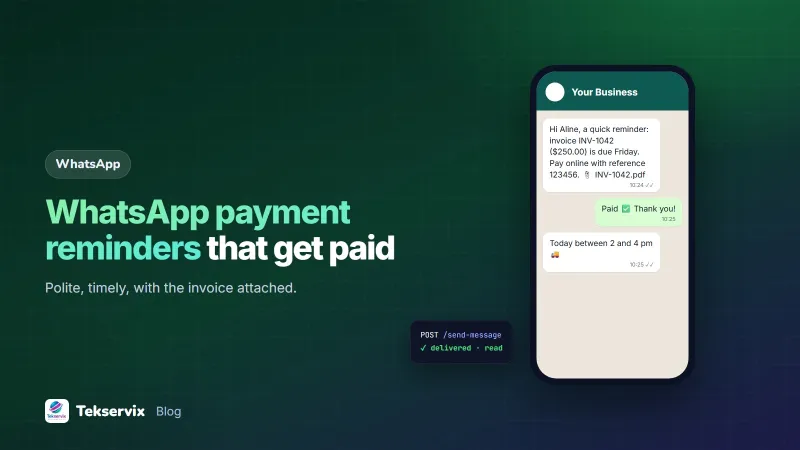
"Hi [Name], a quick reminder that invoice [INV-1042] for [£250] is due on [Friday 14 Nov]. You can pay online with reference [123456] or bank transfer. I've attached the invoice for convenience. Thank you!"
On the due date:
"Hi [Name], invoice [INV-1042] for [£250] is due today. Payment details are on the attached invoice. Let me know once it's sent and I'll confirm receipt."
A few days overdue:
"Hi [Name], I hope all is well. Invoice [INV-1042] for [£250] was due on [14 Nov] and we haven't received it yet. Could you check it reached the right person? Happy to resend anything you need."
A week or more overdue:
"Hi [Name], invoice [INV-1042] for [£250] is now [7] days overdue. Could you let me know when we can expect payment? If there's an issue with the invoice, tell me and we'll sort it out quickly."
Thank-you after payment:
"Payment received for invoice [INV-1042]. Thank you, [Name]! Your receipt is attached."
Tone: firm, never rude#
- Use the customer's name and keep each message under five lines.
- State facts: number, amount, date. No accusations.
- Offer help. "Is there a problem with the invoice?" often reveals the real reason for the delay.
- Don't send reminders at night or on weekends unless that's normal in your trade.
- Never share debt details in a group chat or with anyone but the responsible contact.
Make paying easy#
The fewer steps between reading and paying, the faster you get paid:
- Include the payment link or bank details in every reminder.
- Attach the invoice PDF, so nobody has to search for it. The Tekservix invoice generator produces invoices, receipts and proformas you can download as PDF.
- Confirm receipt promptly when payment arrives, with a receipt.
Our guide to how to write an invoice covers the details that prevent disputes in the first place.
Consent and boundaries#
Reminders about an invoice a customer agreed to are expected service messages. Keep them separate from promotions, use the contact the customer gave you for billing, and stop messaging a number that asks you to use a different channel. Keep records of what you sent, in case of a dispute. WhatsApp's Business Messaging Policy requires that people have given you their number and agreed to hear from you, and that you respect any request to stop.
Automate the reminders#
Remembering every due date by hand doesn't scale beyond a handful of clients. With a WhatsApp API, your invoicing system or a simple script can send each reminder on schedule. WAservix links your business number and sends text and documents through its API, so a daily job can:
- Find invoices due in three days, due today, or overdue by 3, 7 or 14 days.
- Send the matching template with the customer's name, amount and invoice number.
- Attach the invoice PDF from its URL.
- Log each message, and stop when the invoice is marked paid.
Replies come back by webhook, so "paid this morning" can alert whoever handles accounts. Our guide to sending a PDF over the WhatsApp API shows the document part in code.
Measure the effect#
Track the average number of days between invoice date and payment, and the share of invoices paid on time, before and after you start. Better cash flow is the point; our guide to cash flow for businesses shows why a few days' difference matters.
A worked example#
Imagine [Company name], a printing business with about 60 business clients on 14-day terms. Invoices go out by email, and the owner chases late payers by phone at the end of each month, often three or four weeks late. They set up an automated WhatsApp reminder schedule: a friendly note three days before the due date with the invoice attached and the payment link, a short message on the day, and follow-ups at 3 and 7 days overdue. Within two months, most invoices are paid on or near the due date, the end-of-month phone calls shrink to a few clients who genuinely need a payment plan, and several clients reply to say they prefer the WhatsApp reminders to email.
Frequently asked questions
Is it professional to send payment reminders on WhatsApp?
Yes, in markets where customers use WhatsApp for business, a polite reminder there is often more welcome than an email that gets missed. Keep it short, include the invoice number, amount and due date, attach the invoice, and use the same courteous tone you'd use in a formal letter.
When should I send a payment reminder?
A good schedule is a friendly reminder three days before the due date, a short note on the day, and follow-ups at about 3, 7 and 14 days overdue. After that, move to a phone call or formal letter rather than more messages.
How do I write a polite payment reminder on WhatsApp?
Greet the customer by name, state the invoice number, amount and due date, give the payment method, and offer help: "Hi Aline, a quick reminder that invoice INV-1042 for £250 is due on Friday. You can pay online with reference 123456. Let me know if you have any questions."

Tekservix Team
The team behind Tekservix
The Tekservix Team builds and supports Tekservix: WhatsApp and SMS APIs, AI tools, invoicing, PDF and SEO tools for growing businesses. We write practical, tested guides based on what we see our customers do every day.
More articles from the Tekservix Team