Database Design Guide: Tables, Keys and Relationships for Your First App
A practical database design guide for small apps: finding your entities, tables and columns, primary and foreign keys, one-to-many and many-to-many relationships, normalisation, naming, indexes and common mistakes.
On this page
- Step 1: List the things your app keeps track of
- Step 2: Decide the columns
- Step 3: Choose primary keys
- Step 4: Connect tables with foreign keys
- Step 5: Get the relationships right
- One-to-many
- Many-to-many
- One-to-one
- Step 6: Normalise, sensibly
- Step 7: Name things consistently
- Step 8: Choose types and rules
- Step 9: Add indexes for how you'll search
- Draw it before you build it
- Common mistakes
- A worked example
The database is the part of an app that's hardest to change later. Code can be rewritten in an afternoon; a table structure with years of data in it can't. A few hours spent on database design before writing code saves weeks of awkward queries, duplicated data and "why does this customer have three addresses?" bugs. This guide walks through the process for a typical business app.
Step 1: List the things your app keeps track of#
Start with plain language, not SQL. Describe what the app does in a few sentences, then underline the nouns. For a small shop app: "Customers place orders. Each order contains products. Products belong to categories. Customers pay for orders by digital wallet." The nouns (customers, orders, products, categories, payments) are your first draft of tables. Designers call them entities.
Step 2: Decide the columns#
For each table, list what you need to know about one row of it:
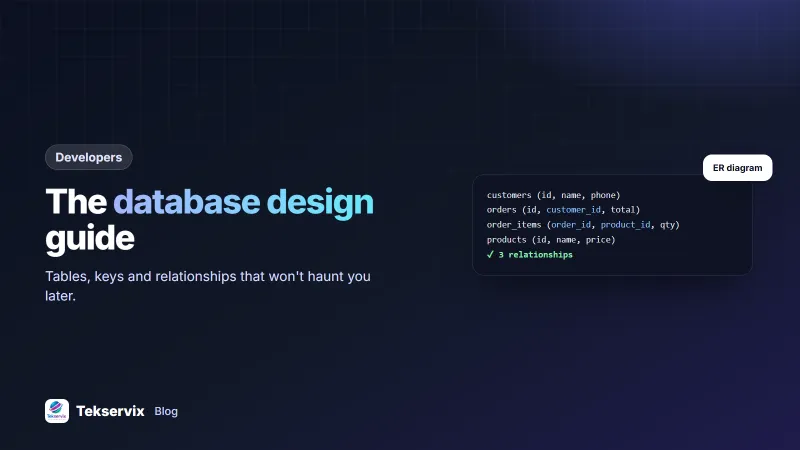
- customers: id, name, phone, email, created_at
- products: id, name, category_id, price, stock, active
- orders: id, customer_id, status, total, created_at
- payments: id, order_id, amount, method, reference, paid_at
Store one fact per column. "Phone numbers" in a single text column with commas between them causes pain; if a customer can have several phone numbers, that's a separate table.
Step 3: Choose primary keys#
Every table needs a primary key: a column whose value is unique for each row and never changes. Most apps use an auto-incrementing integer called id, or a UUID when IDs are created on several machines or exposed publicly.
Don't use real-world data as the primary key, such as a phone number or email. People change them, and every table that refers to the old value breaks.
Step 4: Connect tables with foreign keys#
A foreign key is a column that points to another table's primary key. orders.customer_id points to customers.id, which is how the database knows whose order it is. Declare foreign keys as constraints, so the database refuses an order for a customer that doesn't exist. PostgreSQL's documentation on constraints explains foreign keys, unique rules and checks clearly, and the ideas apply to other databases too.
Step 5: Get the relationships right#
One-to-many#
One customer has many orders; each order belongs to one customer. Put the foreign key on the "many" side: orders.customer_id.
Many-to-many#
An order contains many products, and a product appears in many orders. Neither table can hold the link alone, so create a joining table:
order_items (id, order_id, product_id, quantity, unit_price)Notice unit_price here. The product's price may change next month, but the order must remember what the customer actually paid. Copying the price onto the order line is a deliberate, correct choice.
One-to-one#
Rare in practice. Usually it's a sign that the columns belong in one table, unless the extra data is optional, large or sensitive enough to separate.
Step 6: Normalise, sensibly#
Normalisation means storing each fact once. If the customer's name is saved on every order, a name change has to be made in a hundred places, and some will be missed. Instead, store the name once in customers and refer to it by ID.
Practical rules:
- Each fact lives in one place.
- Repeating groups (phone1, phone2, phone3) become their own table.
- Columns describe the table's subject, not something else. A product's supplier address belongs in a suppliers table.
Don't overdo it. Historical records, such as the price on an order or the address a parcel was actually sent to, are copied on purpose, because they must not change when the original does.
Step 7: Name things consistently#
- Pick plural or singular table names and stick to it:
ordersororder. - Use lowercase with underscores:
created_at,customer_id. - Name foreign keys after the table they point to:
customer_id,product_id. - Avoid abbreviations nobody will remember in a year.
Step 8: Choose types and rules#
- Money: use a decimal type or an integer of the smallest unit. Never floating point.
- Dates and times: a proper date or timestamp type, stored consistently in UTC.
- Status fields: a short, fixed list of values, enforced by the database or the app.
- Required fields: mark them NOT NULL.
- Unique values: add unique constraints where duplicates would be wrong, such as an email per account.
Step 9: Add indexes for how you'll search#
Indexes make lookups fast. Primary keys are indexed automatically; add indexes to foreign keys and to columns you filter or sort by often, such as orders.created_at or customers.phone. Don't index everything: each index slows down writes slightly and uses space. Our guide to the SQL query builder covers finding slow queries.
Draw it before you build it#
An ER (entity-relationship) diagram shows tables as boxes and relationships as lines. It's the fastest way to spot a missing link or a table that doesn't belong. The Tekservix database designer lets you start from a template, paste existing SQL or describe your app, edit tables visually, see the ER diagram, and export SQL for MySQL, PostgreSQL, SQLite or SQL Server.
Common mistakes#
- Storing lists in a single column instead of a related table.
- No foreign key constraints, so orphaned rows pile up.
- Using floats for money.
- Mixing time zones in timestamps.
- Deleting rows that other records depend on, such as customers with past orders. Consider an "active" flag instead.
- Designing for imagined future features instead of what the app needs now.
A worked example#
Imagine a developer building a booking app for a salon. The description: "Clients book appointments for services with a stylist. Each appointment can include several services. Clients pay deposits." The nouns become tables: clients, stylists, services, appointments, appointment_services (the joining table, with the price charged) and payments. Appointments get foreign keys to clients and stylists; payments get one to appointments. Drawn as a diagram, one gap is obvious: nothing records stylists' working hours, so a schedules table is added before a line of app code is written. The app launches with a structure that fits the business, and the first reporting query, revenue per stylist per month, is three simple joins. For testing the API on top of it, see our API testing guide.
Frequently asked questions
What is database design?
Database design is deciding how an application's data is organised: which tables exist, what columns each has, how tables relate to each other through keys, and what rules keep the data consistent.
What is the difference between a primary key and a foreign key?
A primary key uniquely identifies each row in a table, such as a customer's ID. A foreign key is a column in another table that points to that primary key, such as customer_id on an order, linking the two tables.
How do I model a many-to-many relationship?
Create a joining table that holds a foreign key to each side. For products and orders, an order_items table holds order_id and product_id, plus details of that line, such as quantity and price.

Tekservix Team
The team behind Tekservix
The Tekservix Team builds and supports Tekservix: WhatsApp and SMS APIs, AI tools, invoicing, PDF and SEO tools for growing businesses. We write practical, tested guides based on what we see our customers do every day.
More articles from the Tekservix Team